Home / Services / Calculated reports

Calculated reports

Every figure correct. Every report clear.

PRIIPs KIDs, monthly reports, and annual and semi-annual reports. Every figure verified, calculated and presented clearly, combined with charts and text in one finished report.

Per service

What each service produces

ServiceOutputCadenceDelivered in
Annual & semi-annual reportsAnnual and semi-annual report per fundAnnual and semi-annualCalculated reports

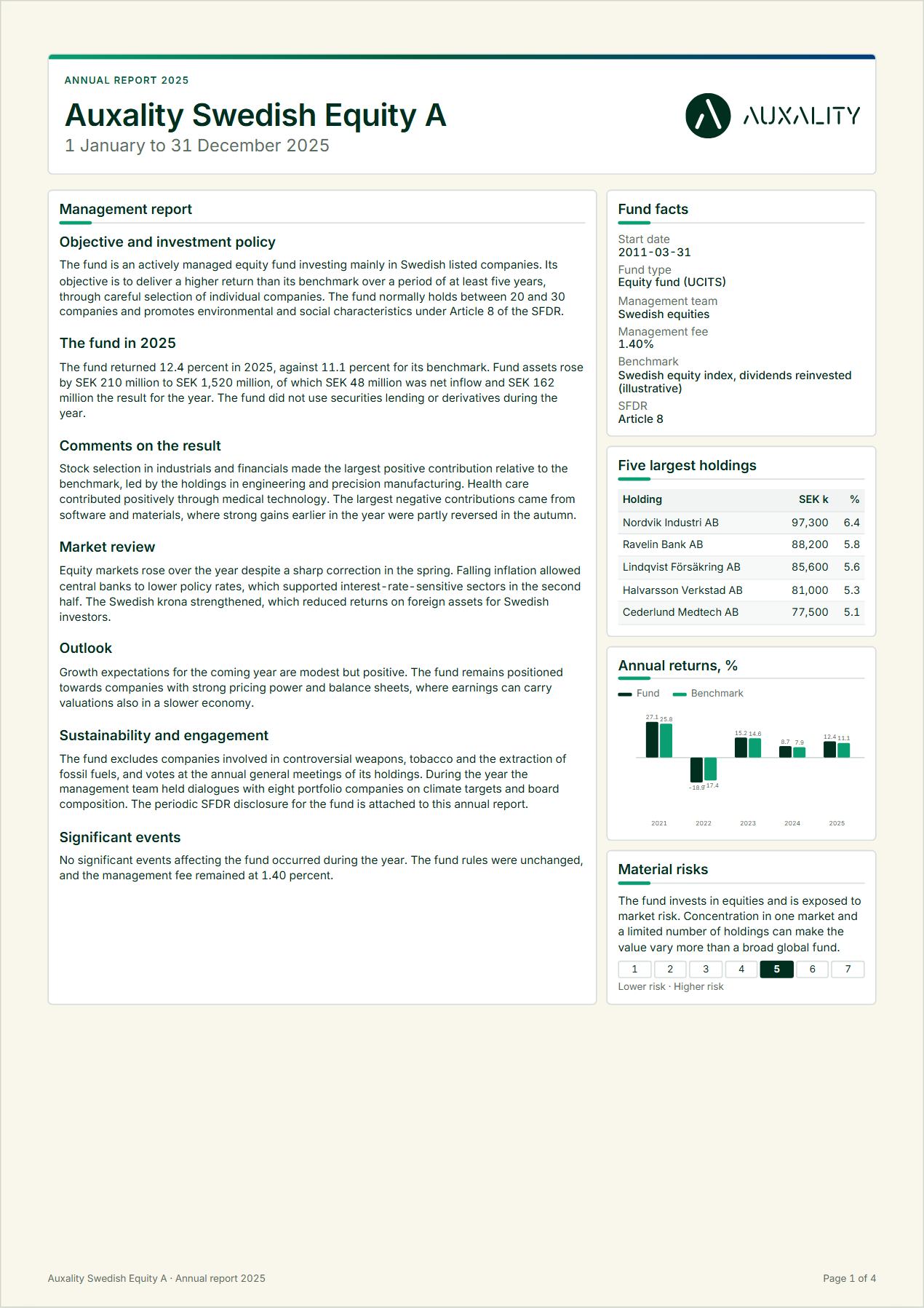
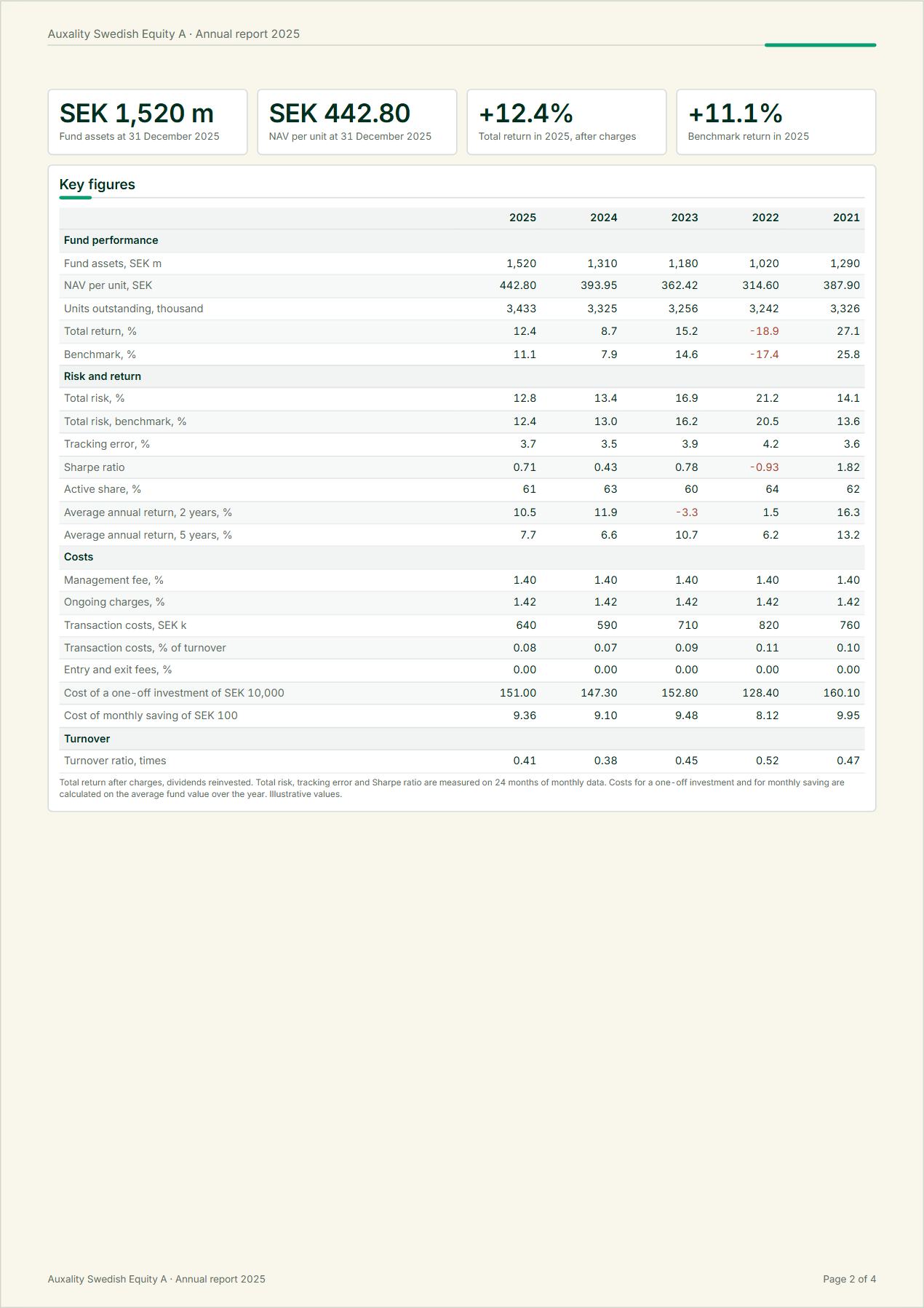
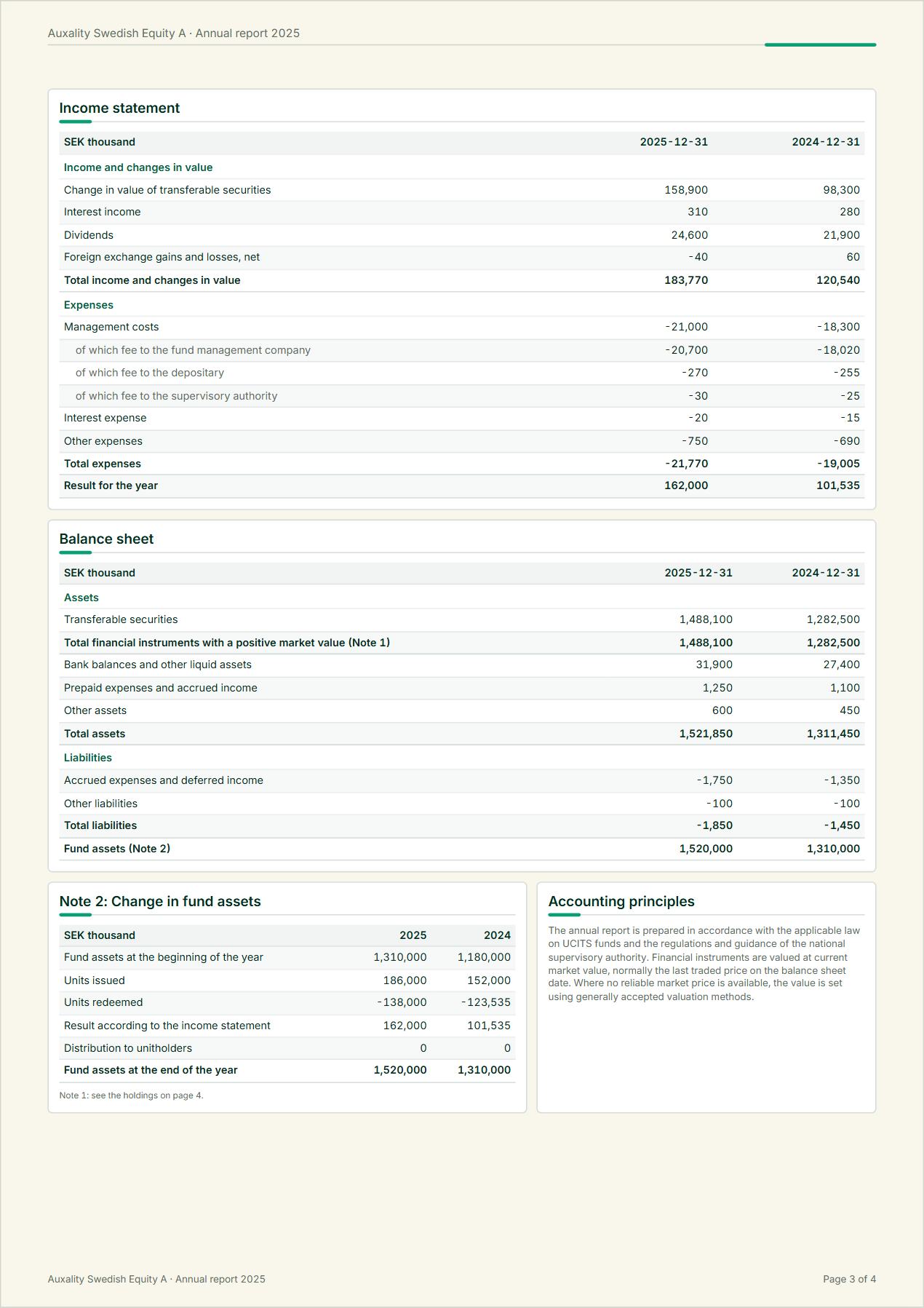
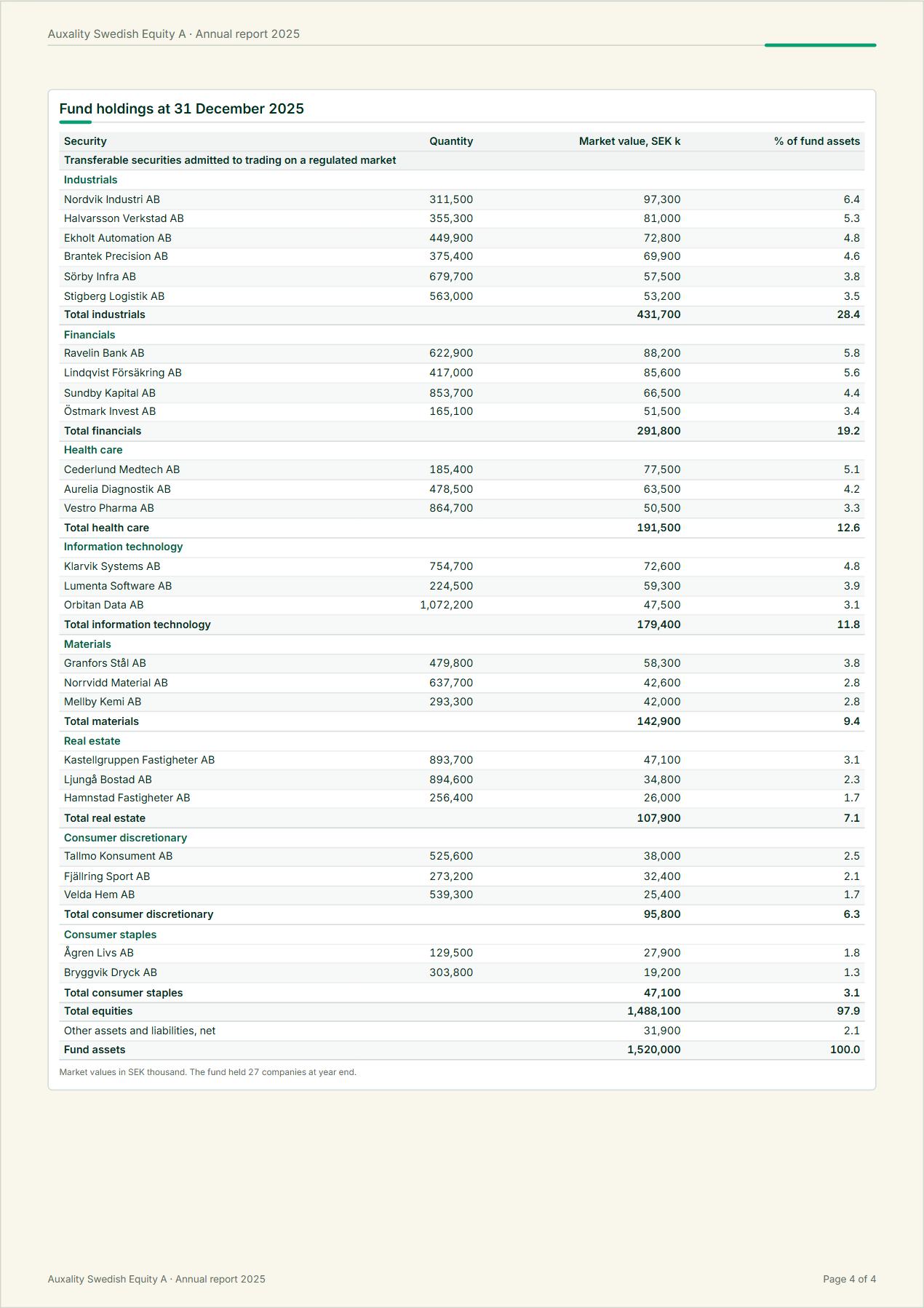
The complete annual and semi-annual report: portfolio holdings, financial statements, footnotes and texts. It is assembled and structured automatically from your source data, validated and designed with illustrative elements such as section dividers, graphs and tables.

Key capabilities

  • Full financial statements and holdings tables
  • Automated layout and typesetting
  • Data validation before generation
  • SFDR periodic annex in the same run
  • Audit-ready lineage behind every number
Output
Annual and semi-annual report per fund
Cadence
Annual and semi-annual
Delivered in
Calculated reports
Holdings tablesHoldings tables per fundAs requested, usually monthlyCalculated reports

The platform compiles the entire table from the raw holdings file you already have. Classification, aggregation and totals are reconciled to the financial statements, so the table always matches the report.

Key capabilities

  • Compiled from raw position data
  • Classification and aggregation to the reporting rules
  • Used across several services
Output
Holdings tables per fund
Cadence
As requested, usually monthly
Delivered in
Calculated reports
PRIIPs KIDPRIIPs KID per share classReviewed on change and at least annually; performance scenarios monthlyCalculated reports

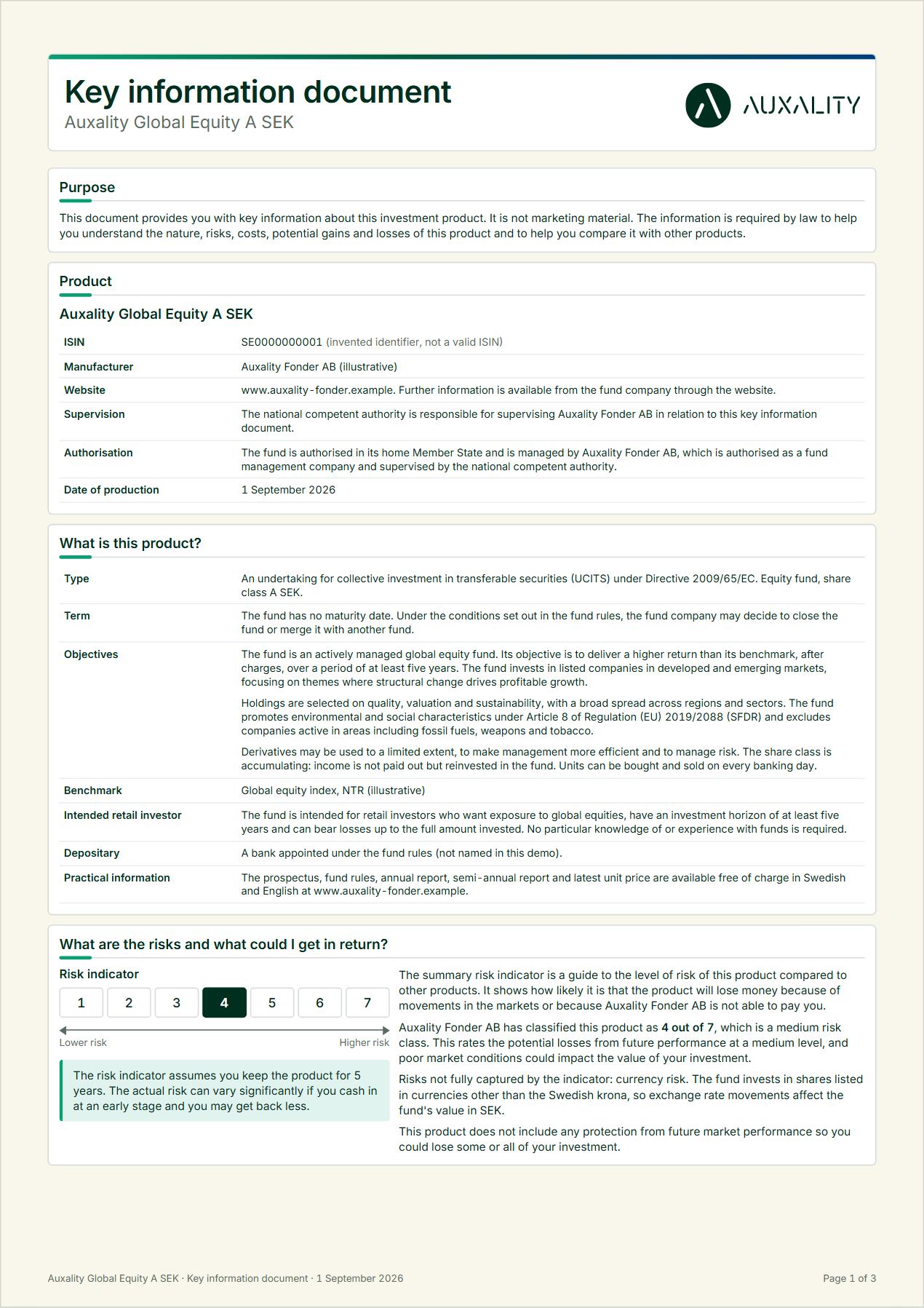
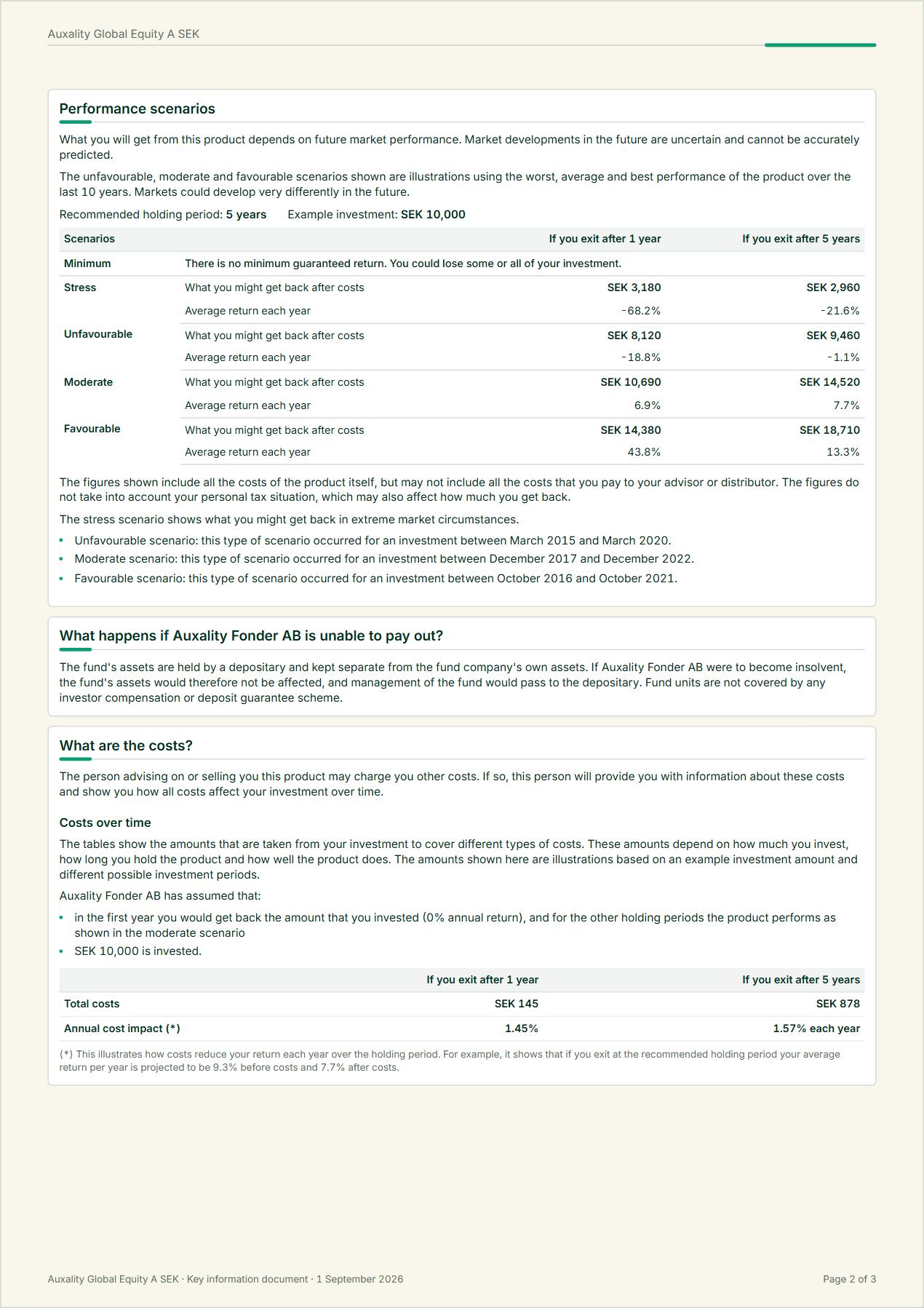
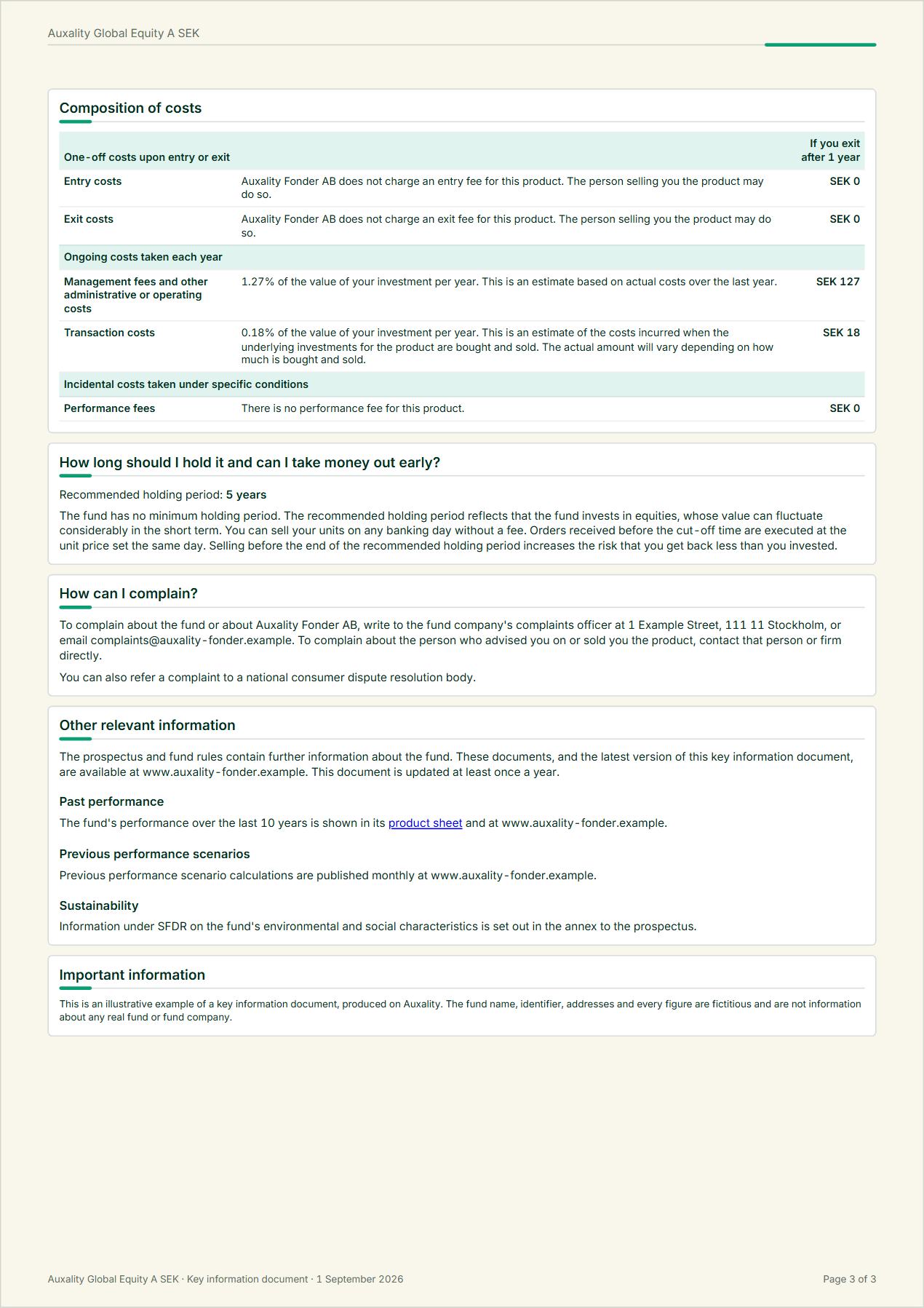
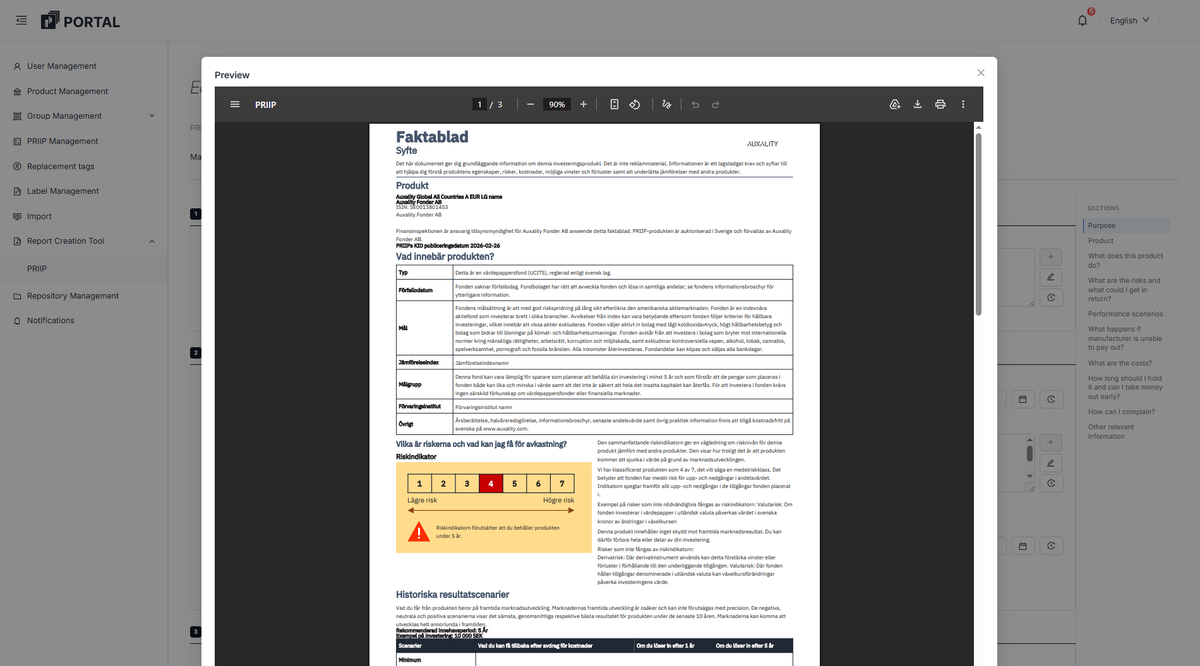
The PRIIPs KID compresses a fund into three pages that should explain investment strategy, potential return, risks and other vital facts. The platform runs the calculations, generates the documents and monitors the results. When markets move a value past its threshold, the affected KIDs are flagged and regenerated rather than discovered stale in an audit.

Two add-ons build on the same calculations, with the same data and no separate tool to reconcile: the monthly history of performance scenarios, and the separate past-performance publication.

Key capabilities

  • SRI and scenario calculations per share class
  • KID generation in all languages and variants
  • Monitoring and republication triggers
  • Export to data vendors
  • Add-ons: historical performance scenarios, past performance
Output
PRIIPs KID per share class
Cadence
Reviewed on change and at least annually; performance scenarios monthly
Delivered in
Calculated reports
Historical performance scenariosPublished scenario history per share classMonthlyCalculated reports, published via Web & commercial content

PRIIPs requires the performance scenarios behind the KID to be recalculated at least monthly, and the scenario values to be published, never overwritten.

The add-on runs the calculations, appends each result to the archive and publishes it, as data files or directly on your website through Web & commercial content.

Key capabilities

  • Monthly scenario calculation per share class
  • Full history, never overwritten
  • Published as data files or on your site
  • KID reference kept current
Output
Published scenario history per share class
Cadence
Monthly
Delivered in
Calculated reports, published via Web & commercial content
Past performancePast-performance publication per share classAnnuallyCalculated reports

For PRIIPs, past performance must be published separately from the KID: a bar chart of up to ten calendar years of annual returns, shown against the benchmark where one is referenced.

The add-on generates it in the prescribed format from the same source, and keeps the KID's reference pointing at the current version.

Key capabilities

  • Up to ten calendar years of annual returns
  • Benchmark comparison where referenced
  • Prescribed format, per share class
  • KID reference kept current
Output
Past-performance publication per share class
Cadence
Annually
Delivered in
Calculated reports
Monthly reportsMonthly report per fund or share classMonthly, or per your calendarCalculated reports

Monthly fund reports: performance, holdings, risk figures and commentary, regenerated each cycle, in layouts that are yours. Dynamic PDF generation carries your brand, not a template look.

Because the report draws on the same source as the regulatory documents, the figure in a monthly report is the same figure as in your legal documents. Produced on the same schedule as everything else. Factsheets and product sheets are the same production on a different layout, and sit under Web & commercial content.

Key capabilities

  • Monthly fund reports per fund
  • Brand-true dynamic PDF layouts
  • Commentary workflow per cycle
  • Distribution via repository and web
Output
Monthly report per fund or share class
Cadence
Monthly, or per your calendar
Delivered in
Calculated reports
Generated PRIIPs key information document, page 1 of 3Generated PRIIPs key information document, page 2 of 3Generated PRIIPs key information document, page 3 of 3

Example of PRIIPs KID. Illustrative data.

Generated annual report, page 1 of 4Generated annual report, page 2 of 4Generated annual report, page 3 of 4Generated annual report, page 4 of 4

Example of Annual report. Illustrative data.

How it is produced

Configured, calculated, rendered

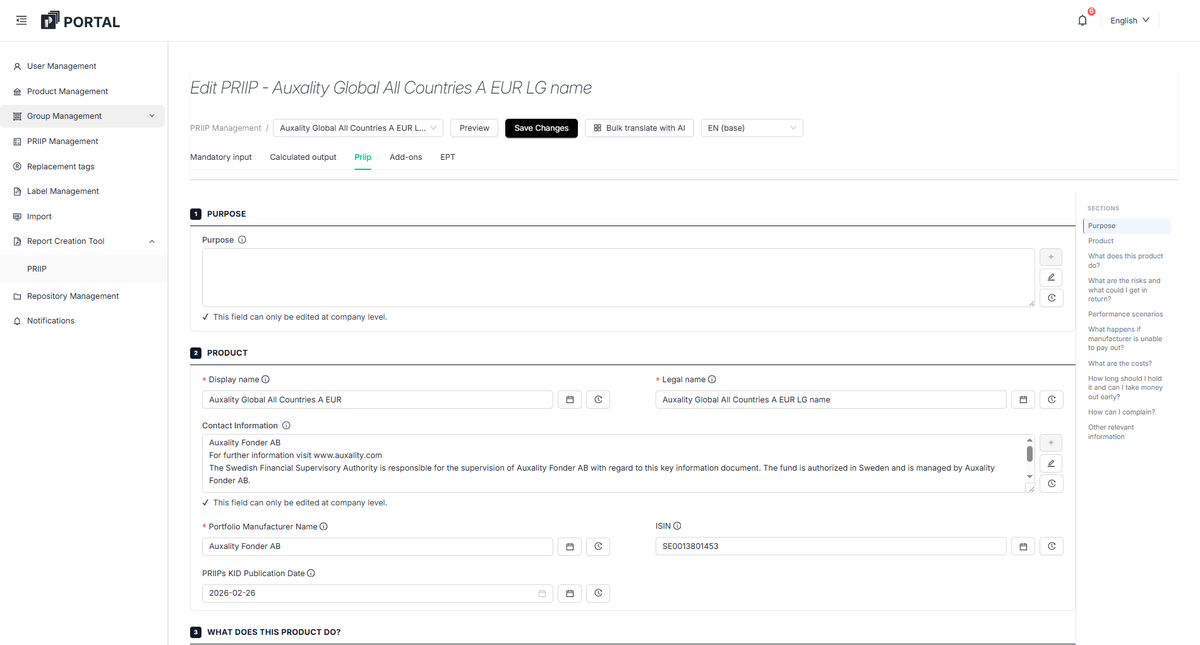
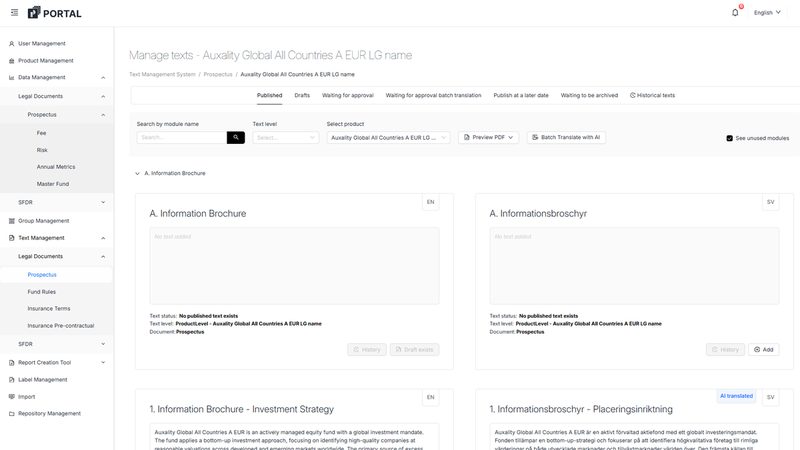
Structured input on the left becomes the regulated document on the right. Shown here for the PRIIPs KID.
PRIIP configuration in Auxality Portal: mandatory input, calculated output, add-ons and the section index of the KID
The rendered key information document (faktablad) previewed inside Auxality Portal, risk indicator and performance scenarios included

Data in, validated at entry

Positions, prices and fund data are structured and validated before anything is calculated.

Calculations under the current rule

SRI, performance scenarios, cost figures and holdings aggregation run on the versioned rulebook.

Reports that reconcile

The same figure lands in the KID, the annual report and the factsheet, and the audit trail is updated.

Every document is produced accessibility adapted.

Also on the platform

Add what you need next.

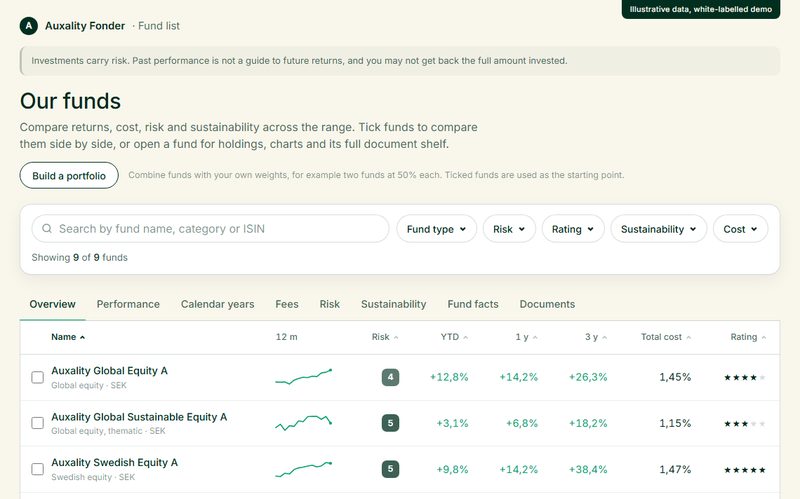
Every section runs on the same foundation, so services from different sections fit together.
01

Legal & product documents

Mostly text. Legal and regulatory text, versioned and controlled, with figures filled in automatically.

Explore


03

Web & commercial content

Online and in print. Your website and commercial documents, designed for your brand and always up to date.

Explore
00

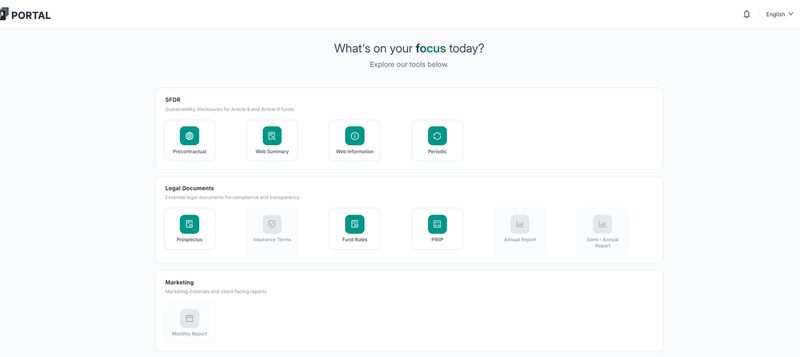
Auxality Portal

One login, one overview, one audit trail, and your brand applied consistently across every output.

Services overview

The next step

Pick a report, or several. Auxality takes it from there.

Name the report that takes the most work, and see it produced on your own products.